How to get Uber and Lyft receipts for past rides
Where Uber and Lyft keep every ride receipt, how to download or resend one, why the total can differ from your card, and when a $14 ride needs one at all.
Your flight lands at 11:12 pm. By 11:40 you're in the back of a Lyft, watching the airport lights slide past. The next morning an Uber takes you to the client's office. On Thursday one Lyft takes you to a client lunch and another gets you back to the airport with twenty minutes to spare.
On Monday the expense system wants an Uber or Lyft receipt for every ride, and that's where it goes wrong. Your inbox has three of the four. One total doesn't match your card, because you added a tip the next morning. And your bank statement shows one Lyft charge for Thursday's two rides.
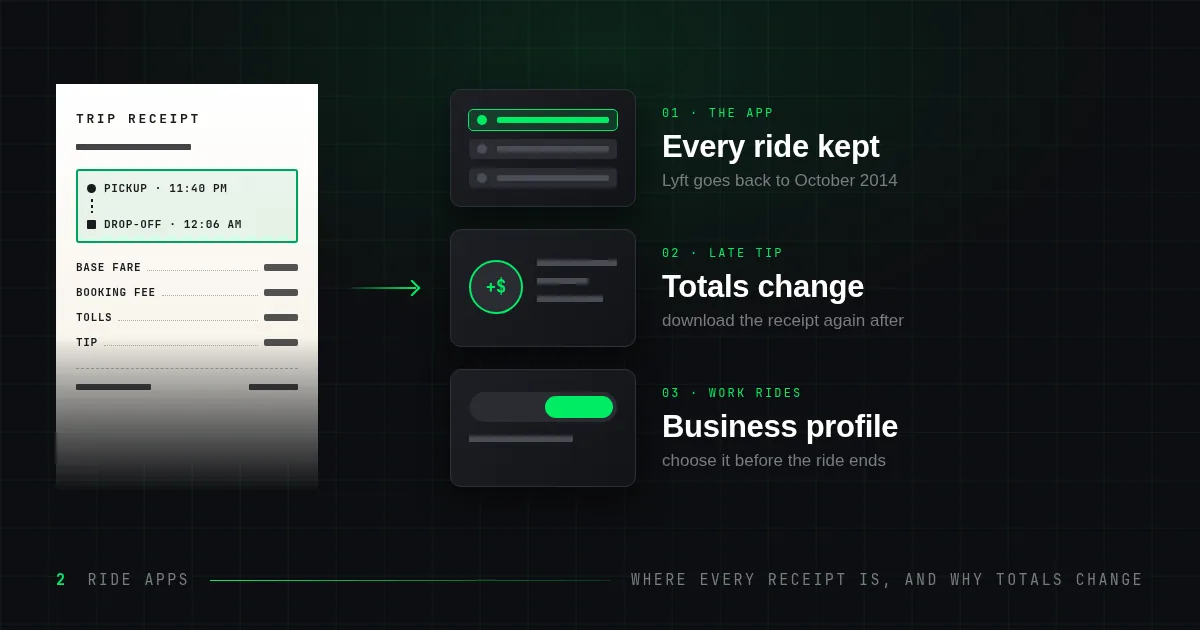
Every one of those receipts still exists. Uber and Lyft keep a receipt for every completed ride in your account. In the Uber app, open Activity, pick the trip and tap Receipt, then Download PDF. In the Lyft app, open Ride history and tap the ride. Lyft's history goes back to October 2014, and it can email you one report covering several rides.
We read Uber's and Lyft's own help pages on 23 November 2026. Every rule below comes from those pages, or from the IRS and the federal travel rules, not from a forum or another receipt app's blog. Where the two companies' pages disagree with themselves, we say so.
This article is general information, not tax, legal or accounting advice. Uber and Lyft change their apps and help pages without notice. Check the current page before you rely on a menu name or a time limit given here.
The short version
- The receipt is already in your account. Uber: Activity, then the trip, then Receipt. Lyft: Ride history, then the ride. Both also email one after each paid ride.
- You can download or resend it. Uber's receipt screen has Download PDF and Resend email buttons. On the web, Uber's trips page is riders.uber.com/trips.
- Lyft can bundle rides. In Ride history, tap Export, pick the rides and Lyft emails a Ride Report with a receipt for each.
- Old rides are still there. Lyft's history goes back to October 2014. Uber says your account holds "a history of all the trips you’ve taken".
- Totals change after the ride. A tip added later changes the receipt. Lyft's daily payment option merges a day's rides into one card charge.
- Riding for work? Switch to a business profile before the ride, and the receipts go to your work email or straight to your expense tool.
- Small rides may not need one for tax. The IRS waives receipts for expenses under $75, other than lodging. Your employer may still want them.
Receipt, invoice or card statement: which one do you need?
You need the ride receipt. It's the document Uber or Lyft issues for each completed ride, and it's the only one that shows where the ride started and ended, when, what it cost and how that cost breaks down.
Three other things get mistaken for it.
A card statement line shows that you paid Uber or Lyft an amount on a date. It doesn't show where you went or why. If you use Lyft's daily payment option, it doesn't even match one ride.
A trip history entry in the app is the list view of your rides. It holds the receipt one tap deeper, but a screenshot of the list isn't the receipt.
A tax invoice is a separate document Uber issues in some countries, for riders who need to claim back sales tax or VAT. In the US you don't need one. We cover it in the section on riding outside the US below.
| Document | Who issues it | What it shows | Enough for an expense claim? |
|---|---|---|---|
| Card statement line | Your bank | Amount and date, sometimes several rides combined | Rarely on its own |
| Trip history entry | Uber or Lyft | The ride in a list | No, open the receipt behind it |
| Ride receipt | Uber or Lyft | Pickup, drop-off, date, time, fare breakdown, total, payment | Yes |
| Tax invoice | Uber, in some countries | Your tax details and the tax charged | Only where your country requires one |
What does a ride receipt have to show?
For US tax, the same four things as any receipt. IRS Publication 463 says documentary evidence "will ordinarily be considered adequate if it shows the amount, date, place, and essential character of the expense". A ride receipt covers all four: the total, the date and time, the pickup and drop-off addresses, and the fact that it was a ride.
The fare breakdown is the part people skim past, and it's where the surprises are. Lyft says its upfront price includes a base rate, tolls, a service fee that is a "Flat amount that varies by region", and "Third-party fees: Local charges such as rideshare taxes, surcharges, and airport fees." Lyft adds: "Each of these fees appear on your ride receipt."
Uber's receipts work the same way. Its pricing page lists a base rate, time and distance, and "A booking fee and any applicable surcharges, fees, and tolls". Some of those lines go to a city or an airport, not to Uber. Philadelphia is a clear example. Uber says that "By law, 1.4% of all rider fares for trips that pick up in Philadelphia go to the Philadelphia Parking Authority (PPA)", shown on the receipt as the Philadelphia TNC Assessment Fee. A ride to or from the airport there also carries an access fee, which Uber says "will appear on your receipt as part of the" Tolls, Surcharges, and Fees section. "This money does not go to the driver or Uber."
That matters if a reviewer asks why a 26-minute ride cost $44. The answer is usually printed on the receipt, because a ride receipt is already an itemized receipt: every fee has its own line.
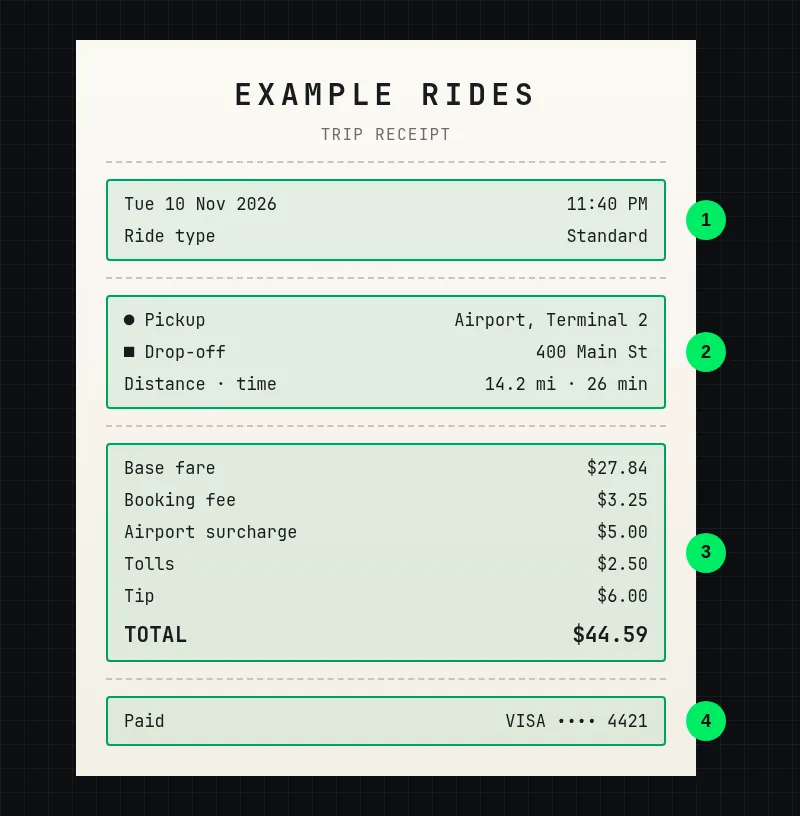
An illustrative ride receipt, not Uber's or Lyft's. 1, when. 2, where from and where to. 3, the fare, each fee and the tip. 4, how it was paid. Together they cover the amount, date, place and essential character IRS Publication 463 asks for.
How do you get an Uber receipt?
Open the app, tap Activity, choose the trip and tap Receipt. That's the route Uber's own help page gives, word for word: select "Activity" from the app menu, select a completed trip, and "To see a full price breakdown, tap “Receipt”".
From the receipt, scroll to the bottom. Uber says to select "Download PDF" if you want a file, or "Resend email" to get it again in your inbox. The PDF is what most expense systems want attached.
On the web
If you'd rather not do it on a phone, Uber's help page on missing receipts gives a browser route: "Go to riders.uber.com/trips." Select the trip, then click "View Receipt" or "Resend Receipt". This is the easier way to work through a week of rides, because you can see the dates side by side.
When the email never arrived
Uber says that when a trip ends it sends the receipt to the email address on your account. If it isn't in your inbox, "check your spam and junk folders". Then check the address itself: in the app, go to Account, then Settings, and tap your name at the top. A work trip receipt that went to an old personal address is the most common reason for a gap.
One detail for travellers in China: "For trips requested through our partners (e.g., WeChat), you can find your receipt in the Uber app."
Old trips and deleted accounts
Uber's help page says your account "contains a history of all the trips you’ve taken and receipts". It doesn't name a cut-off date, so an old trip should still be in Activity as long as the account exists.
That condition is the trap. If you delete your Uber account, Uber says it is "immediately deactivated. After 30 days it will be permanently deleted". You can restore it "by signing in at Uber.com within 30 days of deactivation". If you're closing an account, download the receipts you need first.
Uber's data download isn't a substitute. Its rider folder holds a "Trips Data Summary" with "Times and locations at which a trip was requested, started, and ended, as well as distance traveled". Uber says "pricing calculations" are not included. That's a useful log of where you went, but it has no fare on it.
How do you get a Lyft receipt?
Open the Lyft app menu, tap Ride history and tap the ride. Lyft's help page says: "To view or export ride receipts in your Lyft app, open the app menu and tap 'Ride history.' Tap a ride to view the receipt."
Lyft also emails one. "After you pay for a ride, we email you the ride receipt." Its ride history page puts a time on it: the receipt comes "after your payment is processed for a ride or within 24 hours after a ride."
Several rides at once
This is where Lyft is easier than Uber for an expense report. From Ride history, Lyft's steps are:
- "Tap 'Export' in the top right corner."
- "Select the rides you want receipts for."
- "Tap 'Send report' at the bottom of the screen."
You'll then get what Lyft calls a "Ride Report" email "with a receipt for all of the selected rides". On Android the Export button is a download icon. For our trip, that's one email for all three Lyft rides instead of a search through your inbox.
How far back Lyft goes
Lyft's Ride history covers rides "as far back as October 2014". For anything older, Lyft says: "If you need a receipt copy before October 2014, tap 'Contact Support' at the bottom of this page, so we can help."
A ride that's missing from history may not be finished. Lyft says Ride history "only shows ride details if the payment has been processed for a ride."
When Lyft's emails don't arrive
Search your inbox for "Lyft", then check the spam folder. If your company's email filters are strict, the sender addresses help. Lyft says its emails "will come from an address ending with @lyftmail.com, @lyft.com, or @lyft.zendesk.com." Ask IT to allow those three.
Uber and Lyft side by side
Both apps keep every receipt. They differ in how you get several at once, how long you have to change a tip, and what shows on your card.
| Uber | Lyft | |
|---|---|---|
| Where the receipt is | Activity, then the trip, then Receipt | Ride history, then the ride |
| On the web | riders.uber.com/trips | Not covered by the pages we read |
| How far back | All trips, no cut-off stated | October 2014, older through support |
| Several rides in one go | One receipt at a time | Export sends one Ride Report |
| Getting a file | Download PDF, or Resend email | The emailed receipt, or a Ride Report |
| Tip after the ride | Up to 30 days | 72 hours or 30 days, see below |
| A day's rides in one card charge | Not described in the pages we read | If you choose daily payments |
| Business profile | Receipts to your work email or expense tool | Receipts forwarded if your employer set it up |
Why doesn't the receipt match your card?
Usually because something changed after the ride. Here are the five causes the help pages describe, and what each looks like.
You added a tip later. The receipt total moves when the tip lands. Lyft says "The ride total listed and receipt reflect added tips." Uber lets you "tip drivers up to 30 days after your trip". If you tipped the morning after, download the receipt again so it shows the final amount.
Lyft's own pages disagree about the deadline. Its ride history page says you can tap 'Tip Driver' "up to 72 hours after payment". Its tipping page says "You can add a tip up to 30 days after a ride is complete." We can't tell you which the app enforces today. If you plan to tip late, do it within 72 hours and you're covered either way. Lyft also caps tips: "in-app tips cannot exceed $50 (or 200% of the ride cost)".
Lyft combined your rides. Lyft lets you pay once a day instead of after each ride. "When you choose daily payments, all your rides from one day combine into a single charge." Lyft's own example: "$25 work ride + $15 home ride = one $40 charge on your statement." The statement line reads "*Lyft 2 rides [DATE] lyft.com/charges". The receipts still show each ride, so claim the $25 work ride from its receipt, not the $40 from the statement.
The price changed during the ride. Both apps quote an upfront price, and both say it can change if you add a stop, change the destination, or the trip runs much longer than expected. Uber's promise is that "If your price is different than the upfront price you agreed to, your receipt will explain why."
A pending charge never went through. When you request a ride, your bank may show a temporary hold. Lyft says "A Lyft transaction marked as ‘pending’ isn't a charge." It will "either disappear completely or appear as a refund within 5-7 business days." Don't claim a pending amount.
Credits paid for the ride. If Lyft credit covered the whole fare, Lyft says the total charge amount will show as $0.00. Any tip is still charged to your card. There's nothing to claim for the fare itself.
One more gap to know about: Lyft says that in Ride history "Cancellation fees won't appear, but damage fees will." If you were charged for a cancelled ride and need a record of it, use the card statement and Lyft's dispute route in Ride history.
Riding for work? Set up a business profile first
Both apps let you keep work rides separate from personal ones, and the receipts then go where your employer can use them. The catch is timing: the profile has to be chosen for the ride, and it's easy to forget at 11:40 pm in an airport queue.
Uber's business profile adds your work email and a business card to your account. Uber says this ensures "that all receipts will be sent to your work email address." When you set it up, you can optionally "Select your company’s expense provider to enable automatic receipt forwarding". Uber is strict about when you choose it: "You must select your business ride profile before or during any ride that you want charged to your business credit card."
Lyft's business profile works through your employer's Lyft Business programme. Lyft lists "Automatic receipt forwarding to your expense management system (if your organization has this set up)". Lyft gives you a little more room than Uber: "If you began a ride in your Personal Profile, you can switch to your Business Profile on the rating screen before tapping 'Done' to complete the ride."
Two privacy points are worth knowing. Lyft says "Personal rides are not uploaded as expenses for privacy protection", and that any ride taken under your business profile "will become visible to your organization". On Uber's side, the Receipts API that companies use to pull receipts returns only business trips. Uber says "The rider’s personal trips will not be returned", and the API is "only available for Uber for Business Enterprise clients".
If your company pays through Uber for Business, you may not need to send receipts at all. Uber says invoices for those trips are on the administrator's account at business.uber.com. Ask your finance team before you spend an hour downloading PDFs.
Riding outside the US? You may need an invoice too
In some countries a receipt isn't enough to reclaim sales tax or VAT, and Uber issues a separate tax invoice. Uber's help pages describe two rules that catch business travellers.
Set up your tax details before the ride. Uber says invoice data comes from a "Tax profile" on riders.uber.com, and "If no tax invoice data have been submitted before the trip, the invoice may contain wrong information. Currently the invoices can't be corrected." Enter your company name, address and VAT number before you travel, not on the way home.
There can be a deadline. For trips in Mexico, Uber says you have "up to 90 calendar days after the trip was made" to request an invoice. To get one, Uber's steps are to open the trip at riders.uber.com/trips, select "View Details" and then "Download Invoice".
We read these invoice pages from a connection in Europe, and Uber's help site shows content by location. A US-based rider may see different articles. If you need a VAT or tax invoice for a trip abroad, check the help pages for the country you rode in.
Do you need a receipt for a $14 ride?
For your US tax return, often not. For your employer, often yes. They are different rules, and it helps to know both.
The IRS. Publication 463 lists three cases where you don't need documentary evidence. Two of them fit most short rides: "Your expense, other than lodging, is less than $75" and "You have a transportation expense for which a receipt isn’t readily available." You still need a record of the ride's amount, date, place and business purpose. The IRS lets you group small costs: "Incidental expenses may be totaled in reasonable categories such as taxis, fees and tips, etc."
Federal employees. The Federal Travel Regulation wants "Receipts for any lodging expenses and other expenses costing over $75". Rideshare rides are reimbursable "for the usual fare plus a tip which the agency determines to be reasonable". It also says that "When selecting a TNC, first consideration should be given to the General Services Administration's Ridehail/Rideshare program."
Here's a detail almost nobody notices. The IRS waives receipts for amounts "less than $75". The federal travel rule asks for them on amounts "over $75". A ride that costs exactly $75.00 needs a receipt for the IRS but not for a federal travel claim. Keep the receipt and you're safe under both.
Your employer. Company policies are usually stricter than the IRS. Some follow the $75 line. Harvard's guidance on receipts under $75 gives this example: "if a traveler does not receive a receipt for a $15 taxi ride, although the business purpose must be documented, the expense is not required to be supported by an itemized receipt." Others want a receipt for every ride. Uber and Lyft always have one, so it's simplest to attach it.
Whatever the threshold, keep the PDF once you have it. A receipt that supports a deduction is worth keeping for at least three years, and our guide to how long to keep receipts explains why.
The ride to your own office doesn't count. The IRS is blunt about it: "You can’t deduct the costs of taking a bus, trolley, subway, or taxi, or of driving a car between your home and your main or regular place of work." A ride from the airport to your hotel on a work trip is a different matter. The publication lists "taxi, commuter bus, and airport limousine fares" between "The airport or station and your hotel" as a travel expense.
What about a taxi?
A street taxi has no app history to go back to, so the receipt you get at the end of the ride may be the only one. Ask for it before you get out. If the driver can't print one, write down the date, the pickup and drop-off, the fare and the tip that day, along with the reason for the trip.
That note is what the IRS exception for a transportation expense "for which a receipt isn’t readily available" is meant for. It's also what Harvard's $15 taxi example asks of the traveller: the business purpose has to be documented, even when there's no receipt. Our guide to a lost receipt on an expense claim explains how to write it up for your employer.
When not to use a rebuilt receipt
We make receipt templates, including ride receipts. We'll be direct about this.
You don't need one. Uber and Lyft keep every ride in your account. A receipt you can download in thirty seconds beats anything you could rebuild.
It can be checked. Every real ride has a record on Uber's or Lyft's side, and companies that use Uber for Business or Lyft Business can pull those records themselves. A made-up receipt has nothing behind it, and finance teams now screen for them: on one audit platform, AI-made images were 70.8% of flagged fake receipts by mid-May 2026, as our expense fraud report sets out.
It's fraud. Handing in a receipt you made as though Uber or Lyft issued it is fraud in most places, even when the ride was real and the amount is right. Our terms prohibit using Repceipt to submit a false expense to an employer or to support a tax deduction.
How we checked
We read Uber's rider help pages, Uber's tipping and Philadelphia pricing pages, and Uber's Receipts API introduction on 23 November 2026. Uber's help site only loads in a browser, so we opened each page in a headless Chromium browser and saved its text. We read Lyft's rider help pages and two Lyft Business support pages the same day.
We also read IRS Publication 463 and the Federal Travel Regulation on eCFR, parts 301-10 and 301-52, as current on 19 November 2026. Every quoted line in this article was checked by script against the saved text of its source.
We didn't take rides to test the apps, and we didn't contact either company. This is a reading of what Uber and Lyft publish, not a test of their apps.
What we could not verify
- Lyft's tip deadline. Lyft's ride history page says 72 hours and its tipping page says 30 days. We report both.
- Lyft on the web. The Lyft help pages we read describe the app only. Lyft's own business pages on lyft.com returned an error to our browser, so we relied on Lyft's help centre for business profiles.
- Uber's US invoice pages. Uber's help site served us its invoice articles from a European connection. The Mexico deadline is Uber's own wording, but a US rider may see different articles.
- How far back Uber goes. Uber says the account holds all your trips. It doesn't name a limit, and we didn't test a very old one.
- Taxis. Rules for taxi receipts are set city by city. We haven't covered any city's rules.
Common questions
How do I get a receipt for an old Uber ride?
Open the Uber app, tap Activity, choose the trip and tap Receipt. Then select Download PDF, or Resend email to get it in your inbox. On a computer, go to riders.uber.com/trips and click View Receipt. Uber says your account holds all your trips, and it doesn't name a cut-off date.
How far back can I get Lyft receipts?
Lyft's Ride history goes back to October 2014. Open the app menu, tap Ride history and tap the ride to see its receipt. For a ride before October 2014, Lyft says to contact support from its help page.
Can I get all my Uber or Lyft receipts at once?
Lyft can. In Ride history, tap Export, select the rides and tap Send report. Lyft emails a Ride Report with a receipt for each ride. Uber's help pages describe one receipt at a time, from the app or riders.uber.com/trips. If your employer uses Uber for Business, its administrator can get invoices for work trips in bulk.
Why is my Uber or Lyft receipt different from my bank statement?
Usually a late tip, a combined charge or a pending hold. A tip added after the ride changes the receipt total. Lyft's daily payment option merges a day's rides into one charge. A pending charge is a temporary hold that disappears. Each receipt still shows the ride's own amount.
Can I get an Uber receipt after deleting my account?
Only within 30 days. Uber deactivates a deleted account straight away and permanently deletes it after 30 days. You can restore it by signing in at Uber.com within that window, then download your receipts. Uber's data download lists trips but not their prices.
Do I need a receipt for an Uber ride on my taxes?
Not always. The IRS doesn't require documentary evidence for expenses under $75, other than lodging. You still need a record of the amount, date, places and business purpose. Rides between home and your regular workplace are commuting, and you can't deduct them at all.
Corrections and updates
Pages last read on 23 November 2026. No corrections have been made since.
Uber and Lyft change these pages without notice. If one here is out of date, tell us and we'll update it and give the new date.
Sources
Read on 23 November 2026.
- Uber: How to get a trip receipt and I'm not receiving any emails or receipts
- Uber: How is the price of a trip determined? and Philadelphia Rider Information
- Uber: In-app tips on Uber
- Uber: What is the Business Profile?, Creating a business ride profile and Introduction to Receipts API
- Uber: Delete my Uber account and What's in your data download?
- Uber: I need a trip invoice, FAQs about invoicing and I can't get a correct invoice after a trip
- Lyft: Lyft emails and receipts, In-app ride history tool and Ride pricing and charges
- Lyft: How to tip your driver
- Lyft Business: About how your business profile and personal profile are connected and Creating a business profile linked to your organization
- Internal Revenue Service: Publication 463 (2025), Travel, Gift, and Car Expenses, chapters 1, 4 and 5, for travel fares, commuting and documentary evidence
- General Services Administration: Federal Travel Regulation, 41 CFR 301-10.420 and 41 CFR 301-52.1, on eCFR
- Harvard John A. Paulson School of Engineering and Applied Sciences: Guidance on Receipts Less than $75